SOM-COMe-BT6-PTL (F36)
This product is still in pre-series phase, samples can be ordered by contacting the SECO sales channel. The software resources on this page are not yet fully finalised and validated.
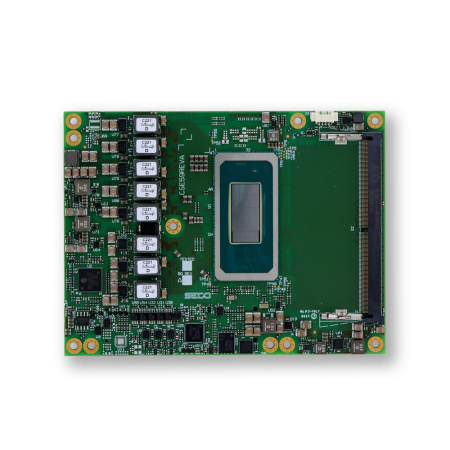
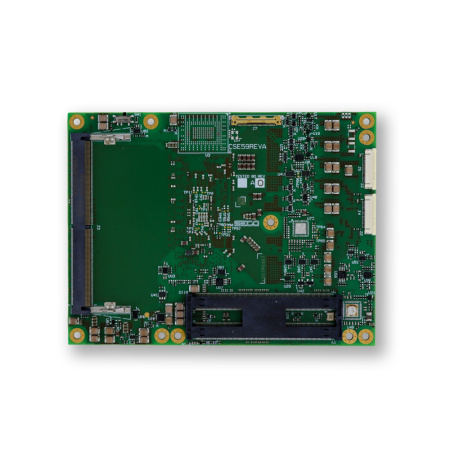
Depending on the configuration and following revisions, the features of the board are subject to change. For detailed information on hardware specifications, please visit www.seco.com
SECO SOM-COMe-BT6-PTL is a Computer on Module (CoM) COM Express® Rel. 3.1 Type 6 (Basic form factor) based on Intel® Core™ Ultra Series 3 processors (Codename: Panther Lake-H), designed for high performance edge and AI workloads with up to 50 TOPS on Intel NPU5 and up to 180 platform TOPS. 
It supports up to 96GB DDR5-5600 via two SO-DIMM slots, integrated Intel® Graphics with up to 12 3rd Gen Xe Cores, and Intel® IPU 7.5 for concurrent camera management, with up to 4 independent displays and display connectivity including dual Type-C interfaces plus additional DP and eDP or LVDS factory alternatives. 
For expansion and I O, the module provides 2.5GbE with Intel® I226 (with TSN support), up to 2x USB4 40Gbps plus multiple USB 10Gbps and USB High Speed ports, and a PCIe stack that can scale up to 20 lanes with a PEG x8 Gen5 port depending on the selected processor, alongside optional onboard NVMe SSD up to 1TB and optional SATA (commercial temperature modules only).
For ordering purposes, the SOM-COMe-BT6-PTL is referred to by its base code, “F36”.
Technical Documents
At the following Links you will find documentations like Manual and Rev. specific documents.
Manual
Datasheet
Product page
Connect to Clea Cloud
Step by step guide to register a Clea OS device and configure endpoints and credentials to enable cloud connectivity and device management.
Heatsink and Heat spreader installation
Software Resources
Pre-installed Software
Off-the-shelf products are shipped with a standard in-house-developed software. The definition of standard, in this case, is “the environment which SECO adopts for validation”. Anyway, custom in-house-developed software with different defaults can be built. Contact your reference sales for further information.
Clea OS
All off-the-shelf products are shipped with Clea OS preinstalled as the standard software environment.
Clea OS is a versatile and robust Linux Operating System framework designed specifically for industrial embedded devices. Based on the open source Yocto Project, Clea OS offers a flexible and customizable platform that can be tailored to meet the specific needs of various hardware architectures and applications.
The Board Support Package (BSP) for this board is fully integrated into Clea OS. It ensures high security and stability through features like OTA (Over-the-Air) updates, dual partitions, and fallback procedures. Additionally, Clea OS includes a complete device manager (Clea Edgehog) for seamless cloud communication, enabling centralized management of product fleets.
Documentation
For a complete explanation of Clea OS and detailed installation instructions, refer to the official documentation:
Download Clea OS Images
To quickly get started, download the latest complete prebuild Clea OS images (or other binaries like U-Boot, Linux Kernel, SDKs) from the official release page:
| Release | Version / Link |
|---|---|
| Clea OS 2-04-00 | Clea OS scarthgap_2-04-00 |
| Clea OS 2-03-00 | Clea OS scarthgap_2-03-00 |
| Clea OS 2-02-00 | Clea OS scarthgap_2-02-00 |
| Clea OS 2-01-00 | Clea OS scarthgap_2-01-00 |
Build Clea OS
The source code for Clea OS can be found at the following Gitlab organization. To build a complete BSP image from source you can check the Get Started pages of the documentation.
Download BIOS, Drivers and tools
This product is still in pre-series phase, samples can be ordered by contacting the SECO sales channel. The software resources on this page are not yet fully finalised and validated.
| Resource | Version / Link |
|---|---|
| BIOS | Coming Soon |
| BIOS Tools | Coming Soon |
| WIN11 LTSC drivers | Coming Soon |
| Linux Kernel | Coming Soon |
| EAPI | EAPI Wiki |